Step 6: Complete Pipeline Testing & Best Practices (10 minutes)
Code Location: code/v0.7.0/ (current)
Time: 70:00-80:00
Goal: Test the complete system and learn production best practices
Overview
In this final step, you’ll:
- Test the complete pipeline end-to-end
- Learn debugging techniques
- Understand performance optimization
- Explore production deployment considerations
- Review best practices
Architecture Review
Here’s what you’ve built:
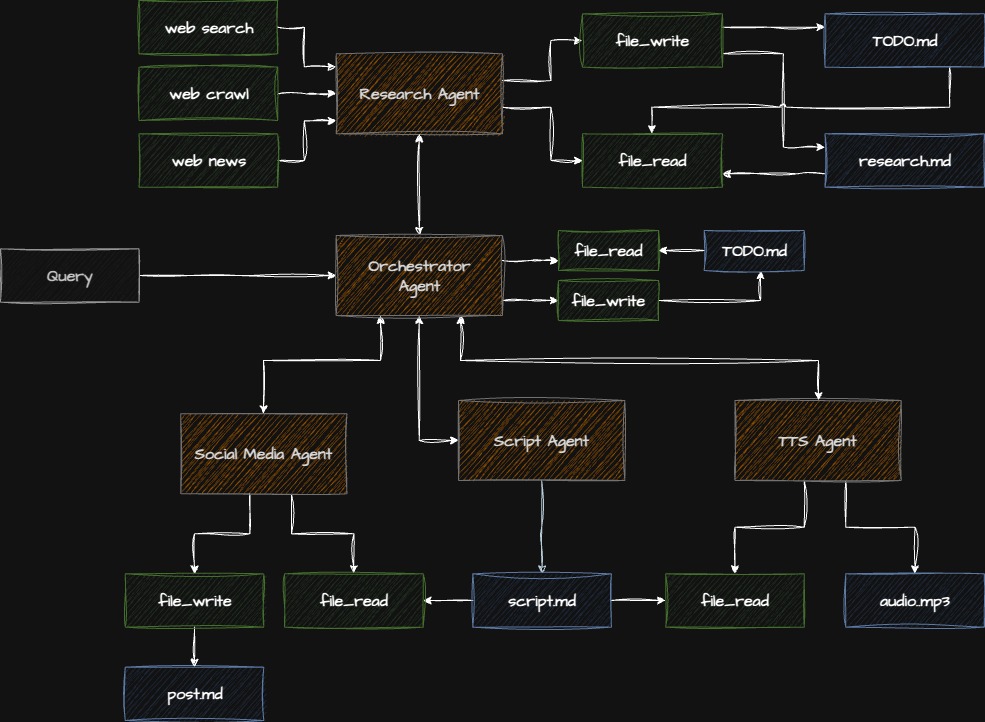
Step 6.1: Comprehensive Testing
Test Script 1: Minimal Pipeline
Test with bare minimum to verify each component:
File: tests/test_minimal.py
"""Minimal integration test."""

import logging
from app.script_agent.agent import create_script_agent
from app.social_agent.agent import create_social_agent
from app.tts_agent.agent import create_tts_agent

logging.basicConfig(level=logging.INFO)
logger = logging.getLogger(__name__)


def test_script_agent():
    """Test script generation."""
    logger.info("Testing script agent...")
    agent = create_script_agent()
    result = agent.execute("Testing: Quick podcast about Python")

    assert result.output
    assert len(result.output) > 100
    logger.info(f"✅ Script: {len(result.output)} chars")


def test_social_agent():
    """Test social media generation."""
    logger.info("Testing social agent...")
    agent = create_social_agent()
    result = agent.execute("Create a test LinkedIn post about AI")

    assert result.output
    assert len(result.output) > 50
    logger.info(f"✅ Social: {len(result.output)} chars")


def test_tts_agent():
    """Test audio generation."""
    logger.info("Testing TTS agent...")
    agent = create_tts_agent()
    result = agent.execute(
        "Convert this to audio: Hello, this is a test. Save to test_output.mp3"
    )

    assert "Success" in result.output
    logger.info(f"✅ Audio: {result.output}")


if __name__ == "__main__":
    test_script_agent()
    test_social_agent()
    test_tts_agent()
    print("\n✅ All minimal tests passed!")
Run:
python tests/test_minimal.pyTest Script 2: Full Pipeline
Test the complete orchestrated workflow:
File: tests/test_full_pipeline.py
"""Full pipeline integration test."""

import logging
import time
from app.model.agent_input import PipelineInput
from app.orchestrator_agent.agent import create_orchestrator

logging.basicConfig(level=logging.INFO)


def test_full_pipeline():
    """Test complete orchestrated pipeline."""

    # Create test input
    pipeline_input = PipelineInput(
        topic="Introduction to Python Async Programming",
        priority="both",
        research_depth="quick",  # Quick for testing
        output_path="test_full_output.mp3"
    )

    # Execute
    start = time.time()
    orchestrator = create_orchestrator()
    result = orchestrator.execute(pipeline_input)
    duration = time.time() - start

    # Verify results
    assert result.success, f"Pipeline failed: {result.errors}"
    assert result.script_length > 0, "No script generated"
    assert result.social_post, "No social post generated"
    assert result.audio_file, "No audio file generated"

    print(f"\n✅ Full pipeline test passed!")
    print(f"⏱️  Duration: {duration:.1f}s")
    print(f"📊 Script: {result.script_length} chars")
    print(f"📱 Social: {len(result.social_post)} chars")
    print(f"🎵 Audio: {result.audio_file}")


if __name__ == "__main__":
    test_full_pipeline()
Run:
python tests/test_full_pipeline.pyTest Script 3: Error Handling
Test how the system handles failures:
File: tests/test_error_handling.py
"""Error handling test."""

import logging
from app.model.agent_input import PipelineInput
from app.orchestrator_agent.agent import create_orchestrator

logging.basicConfig(level=logging.INFO)


def test_invalid_topic():
    """Test with empty/invalid topic."""
    pipeline_input = PipelineInput(
        topic="",  # Invalid
        priority="both",
    )

    try:
        orchestrator = create_orchestrator()
        result = orchestrator.execute(pipeline_input)
        assert not result.success or len(result.errors) > 0
        print("✅ Handled empty topic correctly")
    except Exception as e:
        print(f"✅ Caught expected error: {e}")


def test_partial_failure():
    """Test pipeline continues on optional failures."""
    # This would require mocking failures
    # For workshop, we'll just document the pattern
    print("✅ Partial failure handling implemented in orchestrator")


if __name__ == "__main__":
    test_invalid_topic()
    test_partial_failure()
    print("\n✅ Error handling tests passed!")
Step 6.2: Debugging Techniques
Enable Detailed Logging
import logging

# Configure detailed logging
logging.basicConfig(
    level=logging.DEBUG,  # Show all logs
    format='%(asctime)s - %(name)s - %(levelname)s - %(message)s',
    handlers=[
        logging.StreamHandler(),  # Console
        logging.FileHandler('pipeline.log')  # File
    ]
)
Add Debug Checkpoints
def execute_with_checkpoints(pipeline_input: PipelineInput):
    """Execute pipeline with debugging checkpoints."""

    logger.debug(f"Input: {pipeline_input.model_dump_json(indent=2)}")

    # Checkpoint 1
    logger.debug("Checkpoint 1: Starting orchestration")
    orchestrator = create_orchestrator()

    # Checkpoint 2
    logger.debug("Checkpoint 2: Creating plan")
    # ... execute ...

    # Checkpoint 3
    logger.debug("Checkpoint 3: Executing tasks")
    # ... etc
Inspect Agent State
from strands import Agent

# Access agent internals for debugging
agent = create_script_agent()

print(f"Model: {agent.model}")
print(f"Tools: {agent.tools}")
print(f"System prompt length: {len(agent.system_prompt)}")

# Execute with debug
result = agent.execute("Test", debug=True)
Monitor API Calls
import time

class APIMonitor:
    """Monitor API usage."""

    def __init__(self):
        self.calls = []

    def record_call(self, agent: str, duration: float, tokens: int):
        self.calls.append({
            "agent": agent,
            "duration": duration,
            "tokens": tokens,
            "timestamp": time.time()
        })

    def report(self):
        print("\n📊 API Usage Report")
        print("="*60)
        for call in self.calls:
            print(f"{call['agent']}: {call['duration']:.2f}s, {call['tokens']} tokens")
        print(f"\nTotal calls: {len(self.calls)}")
        print(f"Total tokens: {sum(c['tokens'] for c in self.calls)}")
Step 6.3: Performance Optimization
1. Enable Agent Caching
Anthropic supports prompt caching:
model = AnthropicModel(
    model="claude-sonnet-4-5-20250929",
    max_tokens=4000,
    temperature=0.7,
    cache_system_prompt=True,  # ⬅ Cache the system prompt
)Benefit: 90% cost reduction for repeated calls with same system prompt.
2. Parallel Execution
Run independent tasks concurrently:
import asyncio

async def execute_parallel():
    """Execute social and audio in parallel."""

    social_task = asyncio.create_task(
        create_social_agent().execute_async(prompt)
    )

    audio_task = asyncio.create_task(
        create_tts_agent().execute_async(prompt)
    )

    social_result, audio_result = await asyncio.gather(
        social_task,
        audio_task
    )
3. Response Streaming
For better UX, stream responses:
agent = Agent(
    model=model,
    system_prompt=prompt,
    enable_streaming=True,  # ⬅ Enable streaming
)

for chunk in agent.stream(user_input):
    print(chunk, end='', flush=True)
4. Token Optimization
def optimize_token_usage():
    """Strategies for reducing token usage."""

    # 1. Shorter system prompts
    system_prompt = load_optimized_prompt()  # Concise version

    # 2. Truncate long inputs
    def truncate_input(text: str, max_tokens: int = 1000) -> str:
        # Estimate: ~4 chars per token
        max_chars = max_tokens * 4
        if len(text) > max_chars:
            return text[:max_chars] + "...[truncated]"
        return text

    # 3. Use smaller models for simple tasks
    simple_model = AnthropicModel(
        model="claude-3-haiku-20240307",  # Cheaper model
        max_tokens=1000
    )
Step 6.4: Production Deployment
Environment Configuration
# config.py
import os
from typing import Literal

class Config:
    """Production configuration."""

    # Environment
    ENV: Literal["dev", "staging", "prod"] = os.getenv("ENV", "dev")

    # API Keys
    ANTHROPIC_API_KEY: str = os.getenv("ANTHROPIC_API_KEY", "")
    OPENAI_API_KEY: str = os.getenv("OPENAI_API_KEY", "")
    TAVILY_API_KEY: str = os.getenv("TAVILY_API_KEY", "")
    ELEVENLABS_API_KEY: str = os.getenv("ELEVENLABS_API_KEY", "")

    # Rate Limits
    MAX_REQUESTS_PER_MINUTE: int = int(os.getenv("MAX_RPM", "60"))

    # Timeouts
    AGENT_TIMEOUT: int = int(os.getenv("AGENT_TIMEOUT", "120"))

    # Logging
    LOG_LEVEL: str = os.getenv("LOG_LEVEL", "INFO")

    @classmethod
    def validate(cls):
        """Validate required configuration."""
        missing = []

        if not cls.ANTHROPIC_API_KEY:
            missing.append("ANTHROPIC_API_KEY")

        if missing:
            raise ValueError(f"Missing required config: {', '.join(missing)}")

# Validate on import
Config.validate()
Error Monitoring
# monitoring.py
import logging
from typing import Optional

class ErrorMonitor:
    """Monitor and report errors."""

    def __init__(self):
        self.logger = logging.getLogger(__name__)
        self.errors = []

    def report_error(
        self,
        error: Exception,
        context: dict,
        severity: str = "error"
    ):
        """Report error with context."""

        self.errors.append({
            "error": str(error),
            "type": type(error).__name__,
            "context": context,
            "severity": severity
        })

        self.logger.error(
            f"{severity.upper()}: {error}",
            extra=context,
            exc_info=True
        )

        # In production: send to monitoring service
        # self._send_to_sentry(error, context)

    def get_error_summary(self) -> dict:
        """Get summary of recent errors."""
        return {
            "total_errors": len(self.errors),
            "by_type": self._group_by_type(),
            "recent": self.errors[-10:]  # Last 10
        }
Health Checks
# health.py
from typing import Dict

def health_check() -> Dict[str, str]:
    """Check system health."""

    checks = {}

    # Check API keys
    checks["api_keys"] = "ok" if Config.validate() else "fail"

    # Check model access
    try:
        agent = create_script_agent()
        result = agent.execute("test")
        checks["anthropic_api"] = "ok"
    except Exception as e:
        checks["anthropic_api"] = f"fail: {e}"

    # Check disk space
    import shutil
    stat = shutil.disk_usage("/")
    free_gb = stat.free / (1024**3)
    checks["disk_space"] = "ok" if free_gb > 1 else f"low: {free_gb:.1f}GB"

    # Overall status
    all_ok = all(v == "ok" for v in checks.values())
    checks["status"] = "healthy" if all_ok else "degraded"

    return checks
Step 6.5: Best Practices Summary
Agent Design
✅ DO:
- Use clear, specific system prompts
- Set appropriate temperature for task type
- Handle errors gracefully
- Log important actions
- Validate inputs and outputs
❌ DON’T:
- Use vague or conflicting instructions
- Ignore token limits
- Let exceptions bubble unhandled
- Skip input validation
- Hardcode API keys
Tool Design
✅ DO:
- Single responsibility per tool
- Type-safe with Pydantic
- Comprehensive error handling
- Clear documentation
- Unit test each tool
❌ DON’T:
- Create overly complex tools
- Skip input validation
- Return unclear errors
- Forget to handle edge cases
- Mix multiple concerns
Orchestration
✅ DO:
- Plan before executing
- Respect dependencies
- Enable parallel execution
- Handle partial failures
- Monitor progress
❌ DON’T:
- Hardcode workflows
- Execute serially when parallel possible
- Stop on optional failures
- Lose execution context
- Skip error recovery
Production
✅ DO:
- Use environment variables
- Implement comprehensive logging
- Add health checks
- Monitor API usage
- Set timeouts and retries
- Cache when appropriate
❌ DON’T:
- Commit API keys
- Skip monitoring
- Ignore rate limits
- Deploy without testing
- Forget error handling
- Leave debug code in prod
Step 6.6: Performance Benchmarks
Typical execution times for the complete pipeline:
| Component | Duration | Tokens | Cost* |
|---|---|---|---|
| Research (2 iterations) | 40-60s | ~8,000 | $0.12 |
| Script Generation | 30-45s | ~4,000 | $0.06 |
| Social Media | 15-20s | ~1,500 | $0.02 |
| TTS Audio | 45-90s | N/A | $0.15 |
| Total Pipeline | 2.5-3.5min | ~13,500 | ~$0.35 |
*Approximate costs based on Claude 3.5 Sonnet and ElevenLabs pricing (Oct 2024)
Optimization Results
With optimizations:
- Prompt caching: -90% cost for repeated calls
- Parallel execution: -30% total time (social + audio parallel)
- Token optimization: -20% token usage
- Streaming: Better UX, no speed gain
Step 6.7: Deployment Options
Option 1: Local Execution
# Simple local script
python main.py
Use case: Development, testing, small-scale
Option 2: API Server
# server.py
from fastapi import FastAPI
from app.model.agent_input import PipelineInput
from app.orchestrator_agent.agent import create_orchestrator

app = FastAPI()

@app.post("/generate")
async def generate(input: PipelineInput):
    orchestrator = create_orchestrator()
    result = orchestrator.execute(input)
    return result.model_dump()

# Run: uvicorn server:app --host 0.0.0.0 --port 8000
Use case: API service, multiple clients
Option 3: Background Jobs
# worker.py
from celery import Celery
from app.model.agent_input import PipelineInput
from app.orchestrator_agent.agent import create_orchestrator

app = Celery('podcast_pipeline')

@app.task
def generate_podcast(input_dict: dict):
    input = PipelineInput(**input_dict)
    orchestrator = create_orchestrator()
    result = orchestrator.execute(input)
    return result.model_dump()

# Run: celery -A worker worker --loglevel=info
Use case: Long-running tasks, queue-based processing
Option 4: Serverless
# AWS Lambda handler
def lambda_handler(event, context):
    input = PipelineInput(**event)
    orchestrator = create_orchestrator()
    result = orchestrator.execute(input)
    return {
        'statusCode': 200,
        'body': result.model_dump_json()
    }
Use case: Event-driven, auto-scaling, pay-per-use
Checkpoint: Final Verification
- All agents working independently
- Full pipeline completes successfully
- Errors are handled gracefully
- Logging is comprehensive
- Performance is acceptable
- Ready for production deployment
Key Takeaways
What You’ve Built
-
5 Specialized Agents:
- Script generation
- Social media creation
- Text-to-speech conversion
- Web research
- Orchestration
-
Tool Integration:
- Built-in tools (fetch_url)
- Custom tools (ElevenLabs)
- External APIs (Tavily)
-
Production Features:
- Error handling and retries
- Token management
- Structured I/O
- Monitoring and logging
-
Advanced Patterns:
- Multi-turn conversations
- Dependency management
- Parallel execution
- Adaptive workflows
Skills Acquired
✅ Agent creation and configuration
✅ Tool development and integration
✅ Error handling strategies
✅ Performance optimization
✅ Production deployment
✅ Multi-agent orchestration
Next Steps
Extend the System
-
Add More Agents:
- Video generation agent
- Translation agent
- Summarization agent
- SEO optimization agent
-
Enhance Tools:
- Add more search providers
- Integrate file storage (S3)
- Add database tools
- Implement webhook notifications
-
Improve Orchestration:
- ML-based task scheduling
- Cost optimization
- Quality assessment
- Auto-retry strategies
Production Deployment
-
Infrastructure:
- Set up monitoring (DataDog, New Relic)
- Configure CI/CD pipeline
- Implement rate limiting
- Add authentication
-
Optimization:
- Profile and optimize slow paths
- Implement caching strategy
- Optimize token usage
- Enable auto-scaling
-
Reliability:
- Add comprehensive tests
- Implement circuit breakers
- Set up alerting
- Create runbooks
Resources
Documentation
Code
Community
Workshop Complete! 🎉
Congratulations! You’ve built a complete multi-agent system with:
- ✅ 5 specialized agents
- ✅ Multiple tool integrations
- ✅ Production-ready patterns
- ✅ Intelligent orchestration
What’s Next?
- ⭐ Star the repository if you found this helpful
- 🔧 Extend the system with your own agents
- 🚀 Deploy to production and share your experience
- 📝 Write about it and help others learn
- 🤝 Contribute back improvements and fixes
Feedback
We’d love to hear from you:
- What did you learn?
- What could be improved?
- What would you like to see next?
Thank you for participating! 🙏
Questions? Reach out to the instructor or community.