Step 3: TTS Agent with Custom Tools (10 minutes)
Code Location: code/v0.4.0/
Time: 30:00-40:00
Goal: Create custom tools for external API integration
Overview
In this step, you’ll learn:
- How to create custom tools from scratch
- Integrate external APIs (ElevenLabs TTS)
- Handle binary data and file operations
- Implement proper error handling
- Track token usage across agents
Why Custom Tools?
Built-in tools cover common cases, but you’ll often need:
- Domain-specific APIs: Your business logic
- Custom integrations: Third-party services
- Specialized processing: Unique data transformations
- Company tools: Internal systems
Architecture
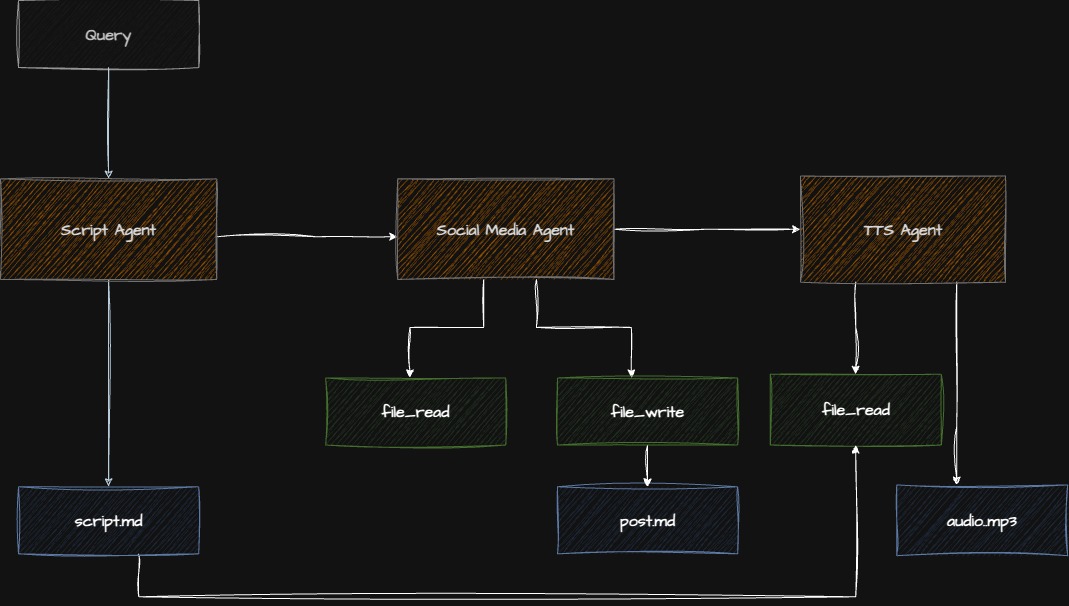
Checkpoint: Starting Point
Before proceeding:
- Completed Step 2
- Navigate to
code/v0.4.0/directory - ElevenLabs API key in
.env
Step 3.1: Understanding Tool Requirements
A good custom tool needs:
- Clear purpose: One specific task
- Type safety: Pydantic validation
- Documentation: Docstrings and descriptions
- Error handling: Graceful failures
- Testing: Unit tests
Step 3.2: Creating a Custom TTS Tool
File: app/tts_agent/tools/elevenlabs_tool.py
"""ElevenLabs text-to-speech tool."""

import os
import logging
from typing import Optional
from pydantic import Field
from elevenlabs import ElevenLabs, VoiceSettings

from strands.tools import tool

logger = logging.getLogger(__name__)


@tool
def text_to_speech(
    text: str = Field(description="Text to convert to speech"),
    voice_id: str = Field(
        default="21m00Tcm4TlvDq8ikWAM",  # Rachel voice
        description="ElevenLabs voice ID"
    ),
    output_path: str = Field(
        default="output.mp3",
        description="Path where audio file will be saved"
    )
) -> str:
    """
    Convert text to speech using ElevenLabs API.

    This tool takes text input and generates natural-sounding
    speech audio, saving it to a file.

    Args:
        text: The text to convert to speech
        voice_id: ElevenLabs voice identifier (default: Rachel)
        output_path: Where to save the audio file

    Returns:
        Success message with file path

    Raises:
        ValueError: If API key missing or text empty
        RuntimeError: If API call fails
    """
    # Validate inputs
    if not text or not text.strip():
        raise ValueError("Text cannot be empty")

    api_key = os.getenv("ELEVENLABS_API_KEY")
    if not api_key:
        raise ValueError("ELEVENLABS_API_KEY not found in environment")

    try:
        # Initialize client
        client = ElevenLabs(api_key=api_key)

        logger.info(f"🎵 Generating audio for {len(text)} characters...")

        # Generate audio
        audio_generator = client.text_to_speech.convert(
            text=text,
            voice_id=voice_id,
            model_id="eleven_multilingual_v2",
            voice_settings=VoiceSettings(
                stability=0.5,
                similarity_boost=0.75,
                style=0.0,
                use_speaker_boost=True
            )
        )

        # Write to file
        with open(output_path, "wb") as f:
            for chunk in audio_generator:
                f.write(chunk)

        logger.info(f"✅ Audio saved to {output_path}")
        return f"Successfully generated audio and saved to {output_path}"

    except Exception as e:
        logger.error(f"❌ TTS generation failed: {e}")
        raise RuntimeError(f"Failed to generate speech: {str(e)}")
Tool Design Breakdown
1. Decorator: @tool makes function available to agents
2. Type Hints: Pydantic Field for validation and description
3. Docstring: Agents read this to understand tool purpose
4. Validation: Check inputs before API call
5. Error Handling: Specific exceptions with context
6. Logging: Track execution for debugging
Step 3.3: Installing External Dependencies
File: pyproject.toml
[project]
dependencies = [
    "strands-agents>=0.3.0",
    "strands-agents-tools>=0.1.0",
    "elevenlabs>=1.0.0",  # ⬅ Add TTS library
    "python-dotenv>=1.0.0",
    # ... other dependencies
]
uv syncStep 3.4: Creating the TTS Agent
File: app/tts_agent/agent.py
"""Text-to-speech agent."""

from strands import Agent
from strands_ai.models.anthropic import AnthropicModel
from app.tts_agent.tools.elevenlabs_tool import text_to_speech

def create_tts_agent() -> Agent:
    """
    Create TTS agent with custom ElevenLabs tool.

    Returns:
        Configured Agent with TTS capability
    """
    model = AnthropicModel(
        model="claude-sonnet-4-5-20250929",
        max_tokens=2000,
        temperature=0.3,  # Lower temperature for tool use
    )

    # Load prompt
    with open("app/tts_agent/prompt.md", "r") as f:
        system_prompt = f.read()

    # Create agent with custom tool
    agent = Agent(
        model=model,
        system_prompt=system_prompt,
        tools=[text_to_speech],  # ⬅ Our custom tool
        enable_streaming=False,
    )

    return agent
Step 3.5: Writing the TTS Prompt
File: app/tts_agent/prompt.md
# Audio Production Agent

You are an audio production specialist responsible for converting
podcast scripts into speech audio files.

## Your Role

Process podcast scripts and generate high-quality audio using
text-to-speech technology.

## Tool Available

You have access to `text_to_speech` tool:

**When to use**:
- User provides script text
- Audio file generation is requested
- Converting text to audio format

**Parameters**:
- `text`: The script content (required)
- `voice_id`: Voice identifier (optional, defaults to Rachel)
- `output_path`: Save location (optional, defaults to output.mp3)

## Processing Guidelines

1. **Script Preparation**:
   - Remove formatting markers (e.g., [INTRO], [HOST])
   - Clean up speaker labels
   - Ensure smooth text flow
   - Remove stage directions

2. **Voice Selection**:
   - Default voice (Rachel) works for most content
   - Use consistent voice throughout

3. **Quality Checks**:
   - Verify text is readable
   - Check for special characters that may cause issues
   - Ensure reasonable length (under 100k characters)

## Output

After generating audio:
1. Confirm successful generation
2. Report file location
3. Provide file size if available
4. Note any warnings or issues

## Error Handling

If generation fails:
- Explain the error clearly
- Suggest fixes (e.g., text too long, API issues)
- Offer alternative approaches
Step 3.6: Integrating into Pipeline
Update: main.py
"""Main entry point for the rooting pipeline."""

import logging
from app.script_agent.agent import create_script_agent
from app.social_agent.agent import create_social_agent
from app.tts_agent.agent import create_tts_agent  # ⬅ Add

logging.basicConfig(level=logging.INFO)
logger = logging.getLogger(__name__)

def main():
    """Execute the complete pipeline."""

    topic = "Building Multi-Agent Systems"

    # Step 1: Generate script
    logger.info("🎙️  Generating podcast script...")
    script_agent = create_script_agent()
    script = script_agent.execute(topic).output
    print(f"✅ Script: {len(script)} chars\n")

    # Step 2: Generate social post
    logger.info("📱 Generating social media post...")
    social_agent = create_social_agent()
    social_post = social_agent.execute(
        f"Create a LinkedIn post for: {script[:300]}..."
    ).output
    print(f"✅ Social post created\n")

    # Step 3: Generate audio
    logger.info("🎵 Generating audio...")
    tts_agent = create_tts_agent()
    audio_result = tts_agent.execute(
        f"Convert this script to audio: {script}"
    )
    print(f"✅ {audio_result.output}\n")

    print("="*80)
    print("PIPELINE COMPLETE")
    print("="*80)

if __name__ == "__main__":
    main()
Step 3.7: Running the Complete Pipeline
python main.pyExpected Output:
INFO - 🎙️  Generating podcast script...
✅ Script: 3421 chars

INFO - 📱 Generating social media post...
✅ Social post created

INFO - 🎵 Generating audio...
INFO - 🎵 Generating audio for 3421 characters...
INFO - ✅ Audio saved to output.mp3
✅ Successfully generated audio and saved to output.mp3

================================================================================
PIPELINE COMPLETE
================================================================================
Check the generated file:
ls -lh output.mp3
# Should show audio file with size

# Play it (macOS)
afplay output.mp3

# Play it (Linux)
mpg123 output.mp3
Checkpoint: Verify Custom Tool
- Tool imports successfully
- Agent can call the tool
- Audio file is generated
- File is playable
- Errors are handled gracefully
Common Issues & Solutions
Issue: ElevenLabs Import Error
ModuleNotFoundError: No module named 'elevenlabs'Solution: Install dependency
uv add elevenlabsIssue: API Key Not Found
ValueError: ELEVENLABS_API_KEY not foundSolution: Add to .env
echo "ELEVENLABS_API_KEY=your_key_here" >> .envIssue: Audio File Empty
Possible causes:
- Text was empty after processing
- API rate limit hit
- Invalid voice ID
Solution: Add detailed logging
logger.info(f"Text length: {len(text)}")
logger.info(f"Voice ID: {voice_id}")
Issue: Tool Not Called
Solution: Make prompt more explicit
## Instructions

ALWAYS use the text_to_speech tool when processing a script.
Do not just acknowledge - actually generate the audio.
Exercise: Add Voice Selection
Enhance the tool with multiple voice options:
VOICE_OPTIONS = {
    "rachel": "21m00Tcm4TlvDq8ikWAM",
    "adam": "pNInz6obpgDQGcFmaJgB",
    "sam": "yoZ06aMxZJJ28mfd3POQ",
}

@tool
def text_to_speech(
    text: str,
    voice_name: str = Field(
        default="rachel",
        description="Voice name: rachel, adam, or sam"
    ),
    output_path: str = "output.mp3"
) -> str:
    voice_id = VOICE_OPTIONS.get(voice_name, VOICE_OPTIONS["rachel"])
    # ... rest of implementation
Understanding Binary Data Handling
TTS returns audio bytes - here’s how to handle them:
# Stream and write chunks
with open(output_path, "wb") as f:  # 'wb' = write binary
    for chunk in audio_generator:
        f.write(chunk)

# Or collect all and write once
audio_bytes = b"".join(audio_generator)
with open(output_path, "wb") as f:
    f.write(audio_bytes)
Key Concepts Review
What You Learned
- Custom Tool Creation: Building tools from scratch
- External API Integration: Calling third-party services
- Binary Data: Handling non-text data
- Error Handling: Robust failure management
- Tool Documentation: Making tools discoverable
Tool Best Practices
DO:
- ✅ Validate inputs thoroughly
- ✅ Provide clear descriptions
- ✅ Handle errors gracefully
- ✅ Log important steps
- ✅ Return meaningful messages
DON’T:
- ❌ Assume inputs are valid
- ❌ Let exceptions bubble uncaught
- ❌ Return cryptic messages
- ❌ Skip documentation
- ❌ Ignore edge cases
Advanced Topics (Time Permitting)
Async Tools
from strands.tools import async_tool

@async_tool
async def async_text_to_speech(text: str) -> str:
    """Async version for concurrent processing."""
    async with aiohttp.ClientSession() as session:
        # Async API calls
        ...
Tool Caching
from functools import lru_cache

@lru_cache(maxsize=100)
def get_voice_id(voice_name: str) -> str:
    """Cache voice ID lookups."""
    return VOICE_OPTIONS.get(voice_name)
Progress Reporting
@tool
def text_to_speech_with_progress(text: str) -> str:
    """TTS with progress updates."""
    chunks = len(text) // 1000

    for i, chunk in enumerate(text_chunks):
        progress = (i + 1) / chunks * 100
        logger.info(f"Progress: {progress:.0f}%")
        # Process chunk

    return "Complete!"
Production Considerations
- ✅ Rate limiting: Track API calls
- ✅ Cost management: Monitor usage
- ✅ Caching: Cache expensive operations
- ✅ Retry logic: Handle transient failures
- ✅ Timeouts: Set reasonable limits
- ✅ Monitoring: Track success rates
Next Steps
You’ve mastered custom tool creation! You now understand:
- How to build tools for any API
- Binary data handling
- Proper error management
- Tool documentation patterns
Ready for complex workflows? Continue to Step 4: Research Agent
Additional Resources
Questions for Discussion
- What other custom tools would be useful for this pipeline?
- How would you handle tool failures that block the pipeline?
- When should you use sync vs async tools?
- How would you test custom tools in isolation?
Time Check: You should be at approximately 40 minutes. Take a short break before diving into the research agent.