Step 5: Orchestrator Agent for Multi-Agent Coordination (15 minutes)
Code Location: code/v0.7.0/
Time: 55:00-70:00
Goal: Build an intelligent orchestrator to coordinate multiple agents
Overview
In this step, you’ll learn:
- Multi-agent orchestration patterns
- TODO-driven execution planning
- Agent-to-agent communication
- Workflow optimization strategies
- Structured input/output with Pydantic
Why Orchestration Matters
Without orchestration:
# Rigid, hardcoded workflow
research = research_agent.execute(topic)
script = script_agent.execute(research)
social = social_agent.execute(script)
audio = tts_agent.execute(script)Problems:
- No adaptability
- No error recovery
- No optimization
- Manual coordination
With orchestration:
# Dynamic, intelligent workflow
orchestrator.execute({
    "topic": topic,
    "priority": "audio",
    "options": {...}
})
# Orchestrator decides:
# - Which agents to use
# - In what order
# - How to handle failures
# - What to optimize for
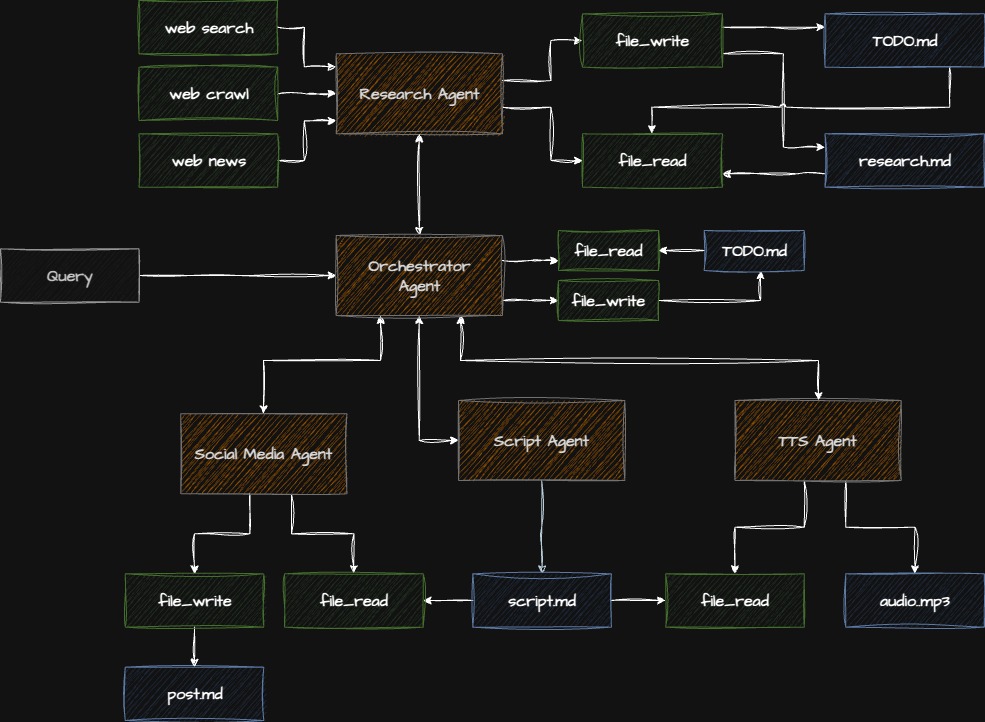
Architecture
Checkpoint: Starting Point
Before proceeding:
- Completed Step 4
- Navigate to
code/v0.7.0/directory - All previous agents working
Step 5.1: Understanding Structured I/O
First, let’s add type safety with Pydantic models.
File: app/model/agent_input.py
"""Pydantic models for agent inputs and outputs."""

from typing import Optional, Literal
from pydantic import BaseModel, Field


class PipelineInput(BaseModel):
    """Input for the complete pipeline."""

    topic: str = Field(
        description="Main topic for content generation"
    )

    priority: Literal["audio", "social", "both"] = Field(
        default="both",
        description="What output to prioritize"
    )

    research_depth: Literal["quick", "standard", "deep"] = Field(
        default="standard",
        description="How thorough the research should be"
    )

    voice_name: str = Field(
        default="rachel",
        description="Voice for text-to-speech"
    )

    output_path: str = Field(
        default="output.mp3",
        description="Where to save audio file"
    )


class OrchestrationResult(BaseModel):
    """Result from orchestrator execution."""

    success: bool
    topic: str
    research_summary: Optional[str] = None
    script_length: Optional[int] = None
    social_post: Optional[str] = None
    audio_file: Optional[str] = None
    errors: list[str] = Field(default_factory=list)
    execution_time: Optional[float] = None


class AgentTask(BaseModel):
    """A single task in the orchestration plan."""

    agent_name: str
    description: str
    depends_on: list[str] = Field(default_factory=list)
    priority: int = 1
    completed: bool = False
    result: Optional[str] = None
    error: Optional[str] = None
Step 5.2: Creating the TODO System
The orchestrator uses a TODO-driven approach:
File: app/orchestrator_agent/TODO_TEMPLATE.md
# Podcast Production TODO List

## Research Phase
- [ ] RESEARCH: Conduct thorough research on the topic
  - Priority: HIGH
  - Depends on: None
  - Output: Research report

## Content Creation Phase
- [ ] SCRIPT: Generate podcast script from research
  - Priority: HIGH
  - Depends on: RESEARCH
  - Output: Script text

- [ ] SOCIAL: Create social media promotion
  - Priority: MEDIUM
  - Depends on: SCRIPT
  - Output: LinkedIn post

## Production Phase
- [ ] AUDIO: Convert script to audio file
  - Priority: HIGH (if audio requested)
  - Depends on: SCRIPT
  - Output: MP3 file

## Completion
- [ ] VERIFY: Verify all outputs are generated
  - Priority: HIGH
  - Depends on: All above
  - Output: Status report
Step 5.3: Creating the Orchestrator Agent
File: app/orchestrator_agent/agent.py
"""Orchestrator agent for coordinating the pipeline."""

import logging
import time
from typing import Optional
from strands import Agent
from strands_ai.models.anthropic import AnthropicModel

from app.model.agent_input import (
    PipelineInput,
    OrchestrationResult,
    AgentTask
)
from app.research_agent.agent import execute_research
from app.script_agent.agent import create_script_agent
from app.social_agent.agent import create_social_agent
from app.tts_agent.agent import create_tts_agent

logger = logging.getLogger(__name__)


class OrchestratorAgent:
    """Orchestrates multi-agent workflow."""

    def __init__(self):
        """Initialize orchestrator with planning agent."""
        self.model = AnthropicModel(
            model="claude-sonnet-4-5-20250929",
            max_tokens=4000,
            temperature=0.3,  # Low temp for consistent planning
        )

        # Load planning prompt
        with open("app/orchestrator_agent/prompt.md", "r") as f:
            system_prompt = f.read()

        self.planner = Agent(
            model=self.model,
            system_prompt=system_prompt,
            enable_streaming=False,
        )

        # Agent registry
        self.agents = {
            "research": lambda: execute_research,
            "script": create_script_agent,
            "social": create_social_agent,
            "tts": create_tts_agent,
        }

    def execute(self, pipeline_input: PipelineInput) -> OrchestrationResult:
        """
        Execute orchestrated pipeline.

        Args:
            pipeline_input: Configuration for pipeline execution

        Returns:
            Orchestration results with all outputs
        """
        start_time = time.time()
        result = OrchestrationResult(
            success=True,
            topic=pipeline_input.topic
        )

        try:
            # Step 1: Create execution plan
            logger.info("📋 Creating execution plan...")
            plan = self._create_plan(pipeline_input)

            # Step 2: Execute plan
            logger.info(f"🚀 Executing {len(plan)} tasks...")
            outputs = self._execute_plan(plan, pipeline_input)

            # Step 3: Collect results
            result.research_summary = outputs.get("research")
            result.script_length = len(outputs.get("script", ""))
            result.social_post = outputs.get("social")
            result.audio_file = outputs.get("audio")

        except Exception as e:
            logger.error(f"❌ Orchestration failed: {e}")
            result.success = False
            result.errors.append(str(e))

        result.execution_time = time.time() - start_time
        return result

    def _create_plan(self, pipeline_input: PipelineInput) -> list[AgentTask]:
        """
        Create execution plan based on input.

        Args:
            pipeline_input: User requirements

        Returns:
            Ordered list of tasks to execute
        """
        # Load TODO template
        with open("app/orchestrator_agent/TODO_TEMPLATE.md", "r") as f:
            todo_template = f.read()

        # Ask planner to customize plan
        planning_prompt = f"""
Given this request:
- Topic: {pipeline_input.topic}
- Priority: {pipeline_input.priority}
- Research depth: {pipeline_input.research_depth}

And this TODO template:
{todo_template}

Create a specific execution plan. List tasks in order with dependencies.
        """

        plan_text = self.planner.execute(planning_prompt).output
        logger.info(f"📝 Plan created:\n{plan_text}")

        # Convert to structured tasks
        # For this workshop, we'll use a simple predefined plan
        tasks = [
            AgentTask(
                agent_name="research",
                description="Research the topic",
                priority=1,
                depends_on=[]
            ),
            AgentTask(
                agent_name="script",
                description="Generate podcast script",
                priority=2,
                depends_on=["research"]
            ),
        ]

        # Add optional tasks based on priority
        if pipeline_input.priority in ["social", "both"]:
            tasks.append(AgentTask(
                agent_name="social",
                description="Create social media post",
                priority=3,
                depends_on=["script"]
            ))

        if pipeline_input.priority in ["audio", "both"]:
            tasks.append(AgentTask(
                agent_name="tts",
                description="Generate audio file",
                priority=3,
                depends_on=["script"]
            ))

        return tasks

    def _execute_plan(
        self,
        plan: list[AgentTask],
        pipeline_input: PipelineInput
    ) -> dict[str, str]:
        """
        Execute tasks in plan.

        Args:
            plan: Ordered list of tasks
            pipeline_input: Configuration

        Returns:
            Dictionary of outputs from each agent
        """
        outputs = {}

        for task in plan:
            logger.info(f"▶️  Executing: {task.description}")

            try:
                # Check dependencies
                for dep in task.depends_on:
                    if dep not in outputs:
                        raise RuntimeError(
                            f"Dependency {dep} not completed"
                        )

                # Execute task
                output = self._execute_task(
                    task,
                    outputs,
                    pipeline_input
                )

                outputs[task.agent_name] = output
                task.completed = True
                task.result = f"Success: {len(output)} chars"

                logger.info(f"✅ Completed: {task.description}")

            except Exception as e:
                logger.error(f"❌ Task failed: {e}")
                task.error = str(e)

                # Decide whether to continue
                if task.priority == 1:  # Critical task
                    raise
                # Continue with other tasks

        return outputs

    def _execute_task(
        self,
        task: AgentTask,
        outputs: dict[str, str],
        pipeline_input: PipelineInput
    ) -> str:
        """
        Execute a single task.

        Args:
            task: Task to execute
            outputs: Previous outputs
            pipeline_input: Configuration

        Returns:
            Task output
        """
        agent_name = task.agent_name

        if agent_name == "research":
            # Research agent
            depth_map = {
                "quick": 1,
                "standard": 2,
                "deep": 3
            }
            iterations = depth_map[pipeline_input.research_depth]
            return execute_research(
                pipeline_input.topic,
                max_iterations=iterations
            )

        elif agent_name == "script":
            # Script agent
            agent = self.agents["script"]()
            research = outputs.get("research", "")
            prompt = f"Create a podcast script about: {pipeline_input.topic}\n\nResearch:\n{research[:2000]}"
            return agent.execute(prompt).output

        elif agent_name == "social":
            # Social agent
            agent = self.agents["social"]()
            script = outputs.get("script", "")
            prompt = f"Create LinkedIn post for this podcast:\n{script[:500]}"
            return agent.execute(prompt).output

        elif agent_name == "tts":
            # TTS agent
            agent = self.agents["tts"]()
            script = outputs.get("script", "")
            result = agent.execute(
                f"Convert to audio, save to {pipeline_input.output_path}: {script}"
            )
            return result.output

        else:
            raise ValueError(f"Unknown agent: {agent_name}")


def create_orchestrator() -> OrchestratorAgent:
    """Create orchestrator instance."""
    return OrchestratorAgent()
Step 5.4: Writing the Orchestrator Prompt
File: app/orchestrator_agent/prompt.md
# Podcast Production Orchestrator

You are an intelligent workflow orchestrator responsible for
coordinating multiple AI agents to produce podcast content.

## Your Role

Create and manage execution plans that:
- Sequence tasks efficiently
- Handle dependencies correctly
- Optimize for user priorities
- Adapt to errors
- Track progress

## Planning Principles

### 1. Dependency Management
- Research must complete before script generation
- Script must complete before social media or audio
- Social media and audio can run in parallel

### 2. Priority Handling
- **HIGH**: Research, Script (always required)
- **MEDIUM**: Social media (if requested)
- **HIGH/MEDIUM**: Audio (based on user priority)

### 3. Error Recovery
- Critical failures (research, script): Stop pipeline
- Optional failures (social, audio): Continue if possible
- Always report all errors in final summary

### 4. Optimization
- Parallel execution when possible
- Minimize wait time
- Cache intermediate results
- Respect API rate limits

## Planning Output Format

For each task, specify:
1. **Task name**: Clear identifier
2. **Description**: What the task does
3. **Agent**: Which agent executes it
4. **Dependencies**: What must complete first
5. **Priority**: Critical vs optional
6. **Estimated time**: Rough duration

## Example Plan
EXECUTION PLAN for “AI Safety Research”
-
RESEARCH (Critical, 60s)
- Agent: research_agent
- Action: Deep research on AI safety
- Depends: None
-
SCRIPT (Critical, 45s)
- Agent: script_agent
- Action: Generate 15-min podcast script
- Depends: RESEARCH
-
SOCIAL (Optional, 30s)
- Agent: social_agent
- Action: Create LinkedIn promotion
- Depends: SCRIPT
- Can run parallel with: AUDIO
-
AUDIO (High, 90s)
- Agent: tts_agent
- Action: Convert script to audio
- Depends: SCRIPT
- Can run parallel with: SOCIAL
Total estimated time: 3.75 minutes Critical path: RESEARCH → SCRIPT → AUDIO
## Adaptation Guidelines

Adjust plans based on:
- User priority settings
- Research depth requirements
- Previous execution history
- Resource availability
- Time constraints

## Output

Provide a clear, actionable execution plan.
Step 5.5: Using the Orchestrator
Update: main.py
"""Main entry point with orchestration."""

import logging
from app.model.agent_input import PipelineInput
from app.orchestrator_agent.agent import create_orchestrator

logging.basicConfig(
    level=logging.INFO,
    format='%(asctime)s - %(levelname)s - %(message)s'
)
logger = logging.getLogger(__name__)


def main():
    """Execute pipeline through orchestrator."""

    # Create structured input
    pipeline_input = PipelineInput(
        topic="Building Production-Ready Multi-Agent AI Systems",
        priority="both",  # Generate both social and audio
        research_depth="standard",
        voice_name="rachel",
        output_path="podcast_output.mp3"
    )

    logger.info("🎬 Starting orchestrated pipeline...")
    logger.info(f"📋 Topic: {pipeline_input.topic}")
    logger.info(f"🎯 Priority: {pipeline_input.priority}")

    # Execute through orchestrator
    orchestrator = create_orchestrator()
    result = orchestrator.execute(pipeline_input)

    # Display results
    print("\n" + "="*80)
    print("ORCHESTRATION RESULTS")
    print("="*80)
    print(f"\n✅ Success: {result.success}")
    print(f"⏱️  Execution time: {result.execution_time:.1f}s")
    print(f"📊 Script length: {result.script_length} characters")

    if result.social_post:
        print(f"\n📱 Social Media Post:")
        print("-" * 80)
        print(result.social_post)

    if result.audio_file:
        print(f"\n🎵 Audio: {result.audio_file}")

    if result.errors:
        print(f"\n⚠️  Errors:")
        for error in result.errors:
            print(f"  - {error}")

    print("\n" + "="*80)


if __name__ == "__main__":
    main()
Step 5.6: Running the Orchestrator
python main.pyExpected Output:
2024-10-12 11:30:00 - INFO - 🎬 Starting orchestrated pipeline...
2024-10-12 11:30:00 - INFO - 📋 Topic: Building Production-Ready...
2024-10-12 11:30:00 - INFO - 🎯 Priority: both
2024-10-12 11:30:00 - INFO - 📋 Creating execution plan...
2024-10-12 11:30:05 - INFO - 📝 Plan created:
2024-10-12 11:30:05 - INFO - 🚀 Executing 4 tasks...
2024-10-12 11:30:05 - INFO - ▶️  Executing: Research the topic
2024-10-12 11:30:45 - INFO - ✅ Completed: Research the topic
2024-10-12 11:30:45 - INFO - ▶️  Executing: Generate podcast script
2024-10-12 11:31:20 - INFO - ✅ Completed: Generate podcast script
2024-10-12 11:31:20 - INFO - ▶️  Executing: Create social media post
2024-10-12 11:31:35 - INFO - ✅ Completed: Create social media post
2024-10-12 11:31:35 - INFO - ▶️  Executing: Generate audio file
2024-10-12 11:32:15 - INFO - ✅ Completed: Generate audio file

================================================================================
ORCHESTRATION RESULTS
================================================================================

✅ Success: True
⏱️  Execution time: 135.3s
📊 Script length: 3421 characters

📱 Social Media Post:
--------------------------------------------------------------------------------
🚀 Just published a new episode on building production-ready AI agents...
[Post content]

🎵 Audio: Successfully generated and saved to podcast_output.mp3

================================================================================
Checkpoint: Verify Orchestration
- Orchestrator creates plan
- Tasks execute in correct order
- Dependencies are respected
- Results are collected properly
- Errors are handled gracefully
Common Issues & Solutions
Issue: Tasks Execute Out of Order
Solution: Check dependency resolution
# Verify all dependencies completed
for dep in task.depends_on:
    if dep not in completed_tasks:
        raise RuntimeError(f"Missing dependency: {dep}")
Issue: Orchestrator Plans Too Much
Solution: Respect user priorities
if pipeline_input.priority == "audio":
    # Skip social media task
    tasks = [t for t in tasks if t.agent_name != "social"]
Issue: Error Recovery Fails
Solution: Categorize task criticality
if task.priority == 1:  # Critical
    raise  # Stop pipeline
else:  # Optional
    logger.warning(f"Optional task failed: {task}")
    continue  # Keep going
Exercise: Add Parallel Execution
Enable concurrent tasks:
import asyncio

async def _execute_plan_parallel(
    self,
    plan: list[AgentTask],
    pipeline_input: PipelineInput
) -> dict[str, str]:
    """Execute independent tasks in parallel."""

    outputs = {}

    # Group by dependency level
    levels = self._group_by_dependencies(plan)

    for level_tasks in levels:
        # Execute tasks at same level in parallel
        results = await asyncio.gather(*[
            self._execute_task_async(task, outputs, pipeline_input)
            for task in level_tasks
        ])

        # Collect results
        for task, result in zip(level_tasks, results):
            outputs[task.agent_name] = result

    return outputs
Key Concepts Review
What You Learned
- Orchestration Patterns: Coordinating multiple agents
- TODO-Driven Execution: Planning and tracking
- Dependency Management: Task ordering and parallelization
- Structured I/O: Type-safe inputs and outputs
- Error Recovery: Graceful degradation
Orchestration Best Practices
DO:
- ✅ Plan before executing
- ✅ Track dependencies
- ✅ Handle errors gracefully
- ✅ Support parallel execution
- ✅ Monitor progress
DON’T:
- ❌ Hardcode workflows
- ❌ Ignore dependencies
- ❌ Stop on optional failures
- ❌ Execute serially when parallel possible
- ❌ Lose task context
Advanced Topics (Time Permitting)
Dynamic Task Addition
def _adapt_plan(self, plan: list[AgentTask], outputs: dict) -> list[AgentTask]:
    """Add tasks based on intermediate results."""

    # If research found video, add video processing
    if "video_url" in outputs["research"]:
        plan.append(AgentTask(
            agent_name="video_processor",
            description="Process video content",
            depends_on=["research"]
        ))

    return plan
Progress Callbacks
class ProgressCallback:
    """Track orchestration progress."""

    def on_task_start(self, task: AgentTask):
        print(f"▶️  Starting: {task.description}")

    def on_task_complete(self, task: AgentTask, result: str):
        print(f"✅ Completed: {task.description}")

    def on_task_error(self, task: AgentTask, error: Exception):
        print(f"❌ Failed: {task.description} - {error}")
Resource Management
class ResourceManager:
    """Manage API rate limits and costs."""

    def __init__(self):
        self.api_calls = {}
        self.costs = {}

    def can_execute(self, task: AgentTask) -> bool:
        """Check if task can execute within limits."""
        return (
            self.api_calls.get(task.agent_name, 0) < self.limits[task.agent_name]
        )
Production Considerations
- ✅ Monitoring: Track execution metrics
- ✅ Logging: Detailed audit trails
- ✅ Retry Logic: Handle transient failures
- ✅ Timeouts: Prevent infinite runs
- ✅ Cost Tracking: Monitor API usage
- ✅ Caching: Reuse results when possible
Next Steps
You’ve mastered multi-agent orchestration! You now understand:
- How to coordinate multiple agents intelligently
- TODO-driven execution planning
- Dependency management and parallelization
- Error recovery strategies
Ready to test everything? Continue to Step 6: Complete Pipeline Testing
Additional Resources
Questions for Discussion
- When is orchestration overhead worth it?
- How do you handle agent failures in production?
- What metrics matter most for orchestration?
- How would you visualize the execution plan?
Time Check: You should be at approximately 70 minutes. Last section ahead!