Step 4: Research Agent with Complex Workflows (15 minutes)
Code Location: code/v0.5.0/
Time: 40:00-55:00
Goal: Build an agent with multi-turn conversations, retry logic, and token management
Overview
In this step, you’ll learn:
- Multi-turn agent conversations
- Implementing retry logic with exponential backoff
- Token management and conversation summarization
- Advanced error handling patterns
- Integration with external search APIs
Why Research Agents Are Different
Unlike previous agents that execute once:
- Iterative: Multiple research cycles
- Stateful: Maintain conversation context
- Adaptive: Refine based on results
- Token-intensive: Risk hitting limits
Architecture
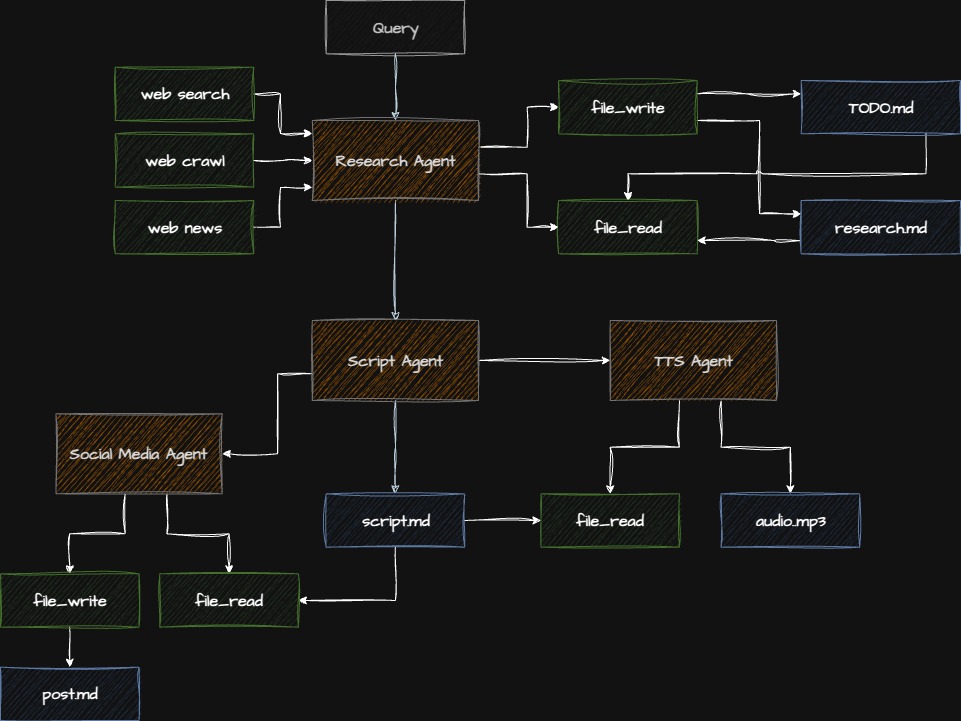
Checkpoint: Starting Point
Before proceeding:
- Completed Step 3
- Navigate to
code/v0.5.0/directory - Tavily API key in
.env
Step 4.1: Understanding the Tavily Search Tool
Tavily provides AI-optimized web search:
- Focused results: Relevant content, not just links
- Context extraction: Answers, not just pages
- Rate limits: Free tier has limits
- Cost: Pay per search
Step 4.2: Creating the Tavily Tool
File: app/research_agent/tools/tavily_tool.py
"""Tavily web search tool."""

import os
import logging
from typing import Optional
from pydantic import Field
from tavily import TavilyClient

from strands.tools import tool

logger = logging.getLogger(__name__)


@tool
def web_search(
    query: str = Field(description="Search query"),
    max_results: int = Field(
        default=5,
        description="Maximum number of results to return"
    )
) -> str:
    """
    Search the web using Tavily AI search.

    Returns focused, AI-optimized search results with
    relevant context and content.

    Args:
        query: The search query
        max_results: Number of results (1-10)

    Returns:
        Formatted search results with content

    Raises:
        ValueError: If API key missing or query empty
        RuntimeError: If search fails
    """
    # Validate
    if not query or not query.strip():
        raise ValueError("Query cannot be empty")

    api_key = os.getenv("TAVILY_API_KEY")
    if not api_key:
        raise ValueError("TAVILY_API_KEY not found in environment")

    try:
        client = TavilyClient(api_key=api_key)

        logger.info(f"🔍 Searching: {query}")

        # Execute search
        response = client.search(
            query=query,
            max_results=max_results,
            search_depth="advanced",  # More thorough
            include_answer=True,      # Get direct answer
            include_raw_content=False # Don't need full HTML
        )

        # Format results
        results = []

        # Add direct answer if available
        if response.get("answer"):
            results.append(f"ANSWER: {response['answer']}\n")

        # Add search results
        for i, result in enumerate(response.get("results", []), 1):
            results.append(f"\n{i}. {result['title']}")
            results.append(f"   URL: {result['url']}")
            results.append(f"   {result['content'][:300]}...")

        formatted = "\n".join(results)
        logger.info(f"✅ Found {len(response.get('results', []))} results")

        return formatted

    except Exception as e:
        logger.error(f"❌ Search failed: {e}")
        raise RuntimeError(f"Search failed: {str(e)}")
Step 4.3: Implementing Retry Logic
File: app/utils/retry_utils.py
"""Retry utilities for handling transient failures."""

import time
import logging
from typing import TypeVar, Callable
from functools import wraps

logger = logging.getLogger(__name__)

T = TypeVar('T')


def retry_with_backoff(
    max_retries: int = 3,
    initial_delay: float = 1.0,
    backoff_factor: float = 2.0,
    max_delay: float = 60.0
):
    """
    Retry decorator with exponential backoff.

    Args:
        max_retries: Maximum number of retry attempts
        initial_delay: Initial delay in seconds
        backoff_factor: Multiplier for delay after each retry
        max_delay: Maximum delay between retries

    Example:
        @retry_with_backoff(max_retries=3)
        def api_call():
            # Your code here
            ...
    """
    def decorator(func: Callable[..., T]) -> Callable[..., T]:
        @wraps(func)
        def wrapper(*args, **kwargs) -> T:
            delay = initial_delay
            last_exception = None

            for attempt in range(max_retries + 1):
                try:
                    return func(*args, **kwargs)

                except Exception as e:
                    last_exception = e

                    if attempt == max_retries:
                        logger.error(
                            f"❌ Failed after {max_retries} retries: {e}"
                        )
                        raise

                    # Calculate delay
                    current_delay = min(
                        delay * (backoff_factor ** attempt),
                        max_delay
                    )

                    logger.warning(
                        f"⚠️  Attempt {attempt + 1} failed: {e}. "
                        f"Retrying in {current_delay:.1f}s..."
                    )

                    time.sleep(current_delay)

            # This should never be reached
            raise last_exception

        return wrapper
    return decorator
Why Exponential Backoff?
Without backoff (constant 1s delay):
Attempt 1: Fail → Wait 1s
Attempt 2: Fail → Wait 1s
Attempt 3: Fail → Wait 1s
Total: 3 seconds
With exponential backoff (1s, 2s, 4s):
Attempt 1: Fail → Wait 1s
Attempt 2: Fail → Wait 2s
Attempt 3: Fail → Wait 4s
Total: 7 seconds (but higher success rate!)Benefits:
- ✅ Gives services time to recover
- ✅ Reduces load during outages
- ✅ Higher success rate
- ✅ More respectful to APIs
Step 4.4: Creating the Research Agent
File: app/research_agent/agent.py
"""Research agent with multi-turn conversation."""

import logging
from strands import Agent
from strands_ai.models.anthropic import AnthropicModel
from app.research_agent.tools.tavily_tool import web_search
from app.utils.retry_utils import retry_with_backoff

logger = logging.getLogger(__name__)


@retry_with_backoff(max_retries=3, initial_delay=2.0)
def create_research_agent() -> Agent:
    """
    Create research agent with retry logic.

    Returns:
        Configured Agent with search capability
    """
    model = AnthropicModel(
        model="claude-sonnet-4-5-20250929",
        max_tokens=4000,
        temperature=0.7,
    )

    with open("app/research_agent/prompt.md", "r") as f:
        system_prompt = f.read()

    agent = Agent(
        model=model,
        system_prompt=system_prompt,
        tools=[web_search],
        enable_streaming=False,
    )

    return agent


def execute_research(
    query: str,
    max_iterations: int = 3
) -> str:
    """
    Execute research with multiple iterations.

    Args:
        query: Research topic or question
        max_iterations: Maximum research cycles

    Returns:
        Final research report
    """
    agent = create_research_agent()

    logger.info(f"🔬 Starting research: {query}")

    # Multi-turn conversation
    conversation = [
        f"Research this topic thoroughly: {query}",
    ]

    for iteration in range(max_iterations):
        logger.info(f"📚 Research iteration {iteration + 1}/{max_iterations}")

        try:
            # Execute with conversation context
            result = agent.execute(
                "\n".join(conversation),
                max_turns=5  # Allow multiple tool calls per iteration
            )

            # Check if research is complete
            output = result.output

            if "RESEARCH COMPLETE" in output or iteration == max_iterations - 1:
                logger.info("✅ Research complete")
                return output

            # Continue research
            conversation.append(output)
            conversation.append(
                "Continue researching. Focus on gaps in current findings."
            )

        except Exception as e:
            logger.error(f"❌ Research iteration failed: {e}")
            if iteration == max_iterations - 1:
                raise
            continue

    return result.output
Step 4.5: Writing the Research Prompt
File: app/research_agent/prompt.md
# Research Analyst

You are an expert research analyst who conducts thorough,
focused research on any topic.

## Your Role

Conduct systematic research by:
1. Breaking down the topic into key questions
2. Searching for authoritative sources
3. Analyzing and synthesizing information
4. Identifying gaps and searching deeper
5. Producing comprehensive reports

## Tool Available

You have `web_search` tool for finding information:

**Use it to**:
- Find factual information
- Get current data and statistics
- Verify claims
- Discover expert perspectives
- Locate authoritative sources

**Search Strategy**:
- Start broad, then narrow down
- Use 2-4 searches per research session
- Quality over quantity
- Focus on authoritative sources
- Verify claims across sources

## Research Process

### Phase 1: Explore (Searches 1-2)
- Understand the topic landscape
- Identify key concepts and terms
- Find authoritative sources

### Phase 2: Deep Dive (Searches 3-4)
- Focus on specific aspects
- Verify important claims
- Fill knowledge gaps

### Phase 3: Synthesize
- Combine findings
- Draw insights
- Identify patterns
- Form conclusions

## Report Format

Structure your final report:

# Research Report: [Topic]

## Executive Summary
[2-3 sentence overview]

## Key Findings
1. [Main finding with source]
2. [Main finding with source]
3. [Main finding with source]

## Detailed Analysis
[Comprehensive discussion with citations]

## Sources
- [URL 1] - [Description]
- [URL 2] - [Description]

## Conclusion
[Synthesis and insights]

## Research Complete
[End with this marker when done]

## Token Management

To stay within limits:
- Be concise in intermediate steps
- Focus on key information
- Avoid repeating previous findings
- Summarize efficiently

## Quality Standards

- ✅ Cite all sources
- ✅ Use multiple sources
- ✅ Verify key claims
- ✅ Be objective
- ✅ Acknowledge uncertainty
- ❌ Never fabricate sources
- ❌ Don't present opinions as facts
Step 4.6: Token Management Strategy
When conversations get long, tokens add up fast:
def manage_conversation_tokens(
    conversation: list[str],
    max_tokens: int = 10000
) -> list[str]:
    """
    Keep conversation within token budget.

    Strategy:
    1. Keep first message (original query)
    2. Keep last 2-3 messages (recent context)
    3. Summarize middle messages
    """
    if len(conversation) <= 3:
        return conversation

    # Estimate: ~4 chars per token
    total_chars = sum(len(msg) for msg in conversation)
    estimated_tokens = total_chars / 4

    if estimated_tokens < max_tokens:
        return conversation

    # Keep first and last messages
    return [
        conversation[0],  # Original query
        "...[previous research summarized]...",
        conversation[-2],  # Recent context
        conversation[-1],  # Latest message
    ]
Step 4.7: Complete Integration
Update: main.py
"""Main entry point."""

import logging
from app.script_agent.agent import create_script_agent
from app.social_agent.agent import create_social_agent
from app.tts_agent.agent import create_tts_agent
from app.research_agent.agent import execute_research  # ⬅ Add

logging.basicConfig(level=logging.INFO)
logger = logging.getLogger(__name__)


def main():
    """Execute complete pipeline with research."""

    topic = "Latest developments in Multi-Agent AI Systems"

    # Step 1: Research
    logger.info("🔬 Conducting research...")
    research_report = execute_research(topic, max_iterations=2)
    print(f"✅ Research complete: {len(research_report)} chars\n")

    # Step 2: Generate script based on research
    logger.info("🎙️  Generating script from research...")
    script_agent = create_script_agent()
    script = script_agent.execute(
        f"Create a podcast script based on this research:\n\n{research_report[:2000]}"
    ).output
    print(f"✅ Script generated\n")

    # Step 3: Social media
    logger.info("📱 Creating social post...")
    social_agent = create_social_agent()
    social_post = social_agent.execute(
        f"Create LinkedIn post for: {script[:300]}"
    ).output
    print(f"✅ Social post created\n")

    # Step 4: Audio
    logger.info("🎵 Generating audio...")
    tts_agent = create_tts_agent()
    tts_agent.execute(f"Convert to audio: {script}")
    print(f"✅ Audio generated\n")

    print("="*80)
    print("COMPLETE RESEARCH-DRIVEN PIPELINE")
    print("="*80)

if __name__ == "__main__":
    main()
Step 4.8: Running with Research
# Install Tavily
uv add tavily-python

# Run pipeline
python main.py
Expected Output:
INFO - 🔬 Starting research: Latest developments...
INFO - 📚 Research iteration 1/2
INFO - 🔍 Searching: Multi-Agent AI Systems 2024
INFO - ✅ Found 5 results
INFO - 📚 Research iteration 2/2
INFO - 🔍 Searching: Multi-agent coordination frameworks
INFO - ✅ Found 5 results
INFO - ✅ Research complete
✅ Research complete: 2847 chars

INFO - 🎙️  Generating script from research...
✅ Script generated

[Rest of pipeline...]
Checkpoint: Verify Research Agent
- Agent performs multiple searches
- Retry logic handles failures
- Token limits are respected
- Research quality is good
- Pipeline completes successfully
Common Issues & Solutions
Issue: API Rate Limiting
TavilyError: Rate limit exceededSolution: Add delays between searches
import time

@tool
def web_search(query: str) -> str:
    time.sleep(1)  # Rate limit protection
    # ... rest of code
Issue: Token Limit Exceeded
AnthropicError: Token limit exceededSolution: Summarize conversation
# Keep conversation short
if len(conversation_history) > 5:
    conversation_history = summarize_conversation(conversation_history)
Issue: Infinite Research Loop
Solution: Set max iterations and check completion
if iteration >= max_iterations:
    return "Research time limit reached. Current findings: ..."
Exercise: Add Research Quality Metrics
Track research effectiveness:
class ResearchMetrics:
    """Track research quality metrics."""

    def __init__(self):
        self.searches_performed = 0
        self.sources_found = 0
        self.iterations = 0
        self.total_time = 0.0

    def report(self) -> str:
        return f"""
Research Metrics:
- Searches: {self.searches_performed}
- Sources: {self.sources_found}
- Iterations: {self.iterations}
- Time: {self.total_time:.1f}s
- Efficiency: {self.sources_found / self.searches_performed:.1f} sources/search
        """
Key Concepts Review
What You Learned
- Multi-turn Conversations: Stateful agent interactions
- Retry Logic: Exponential backoff for resilience
- Token Management: Preventing context overflow
- External APIs: Tavily search integration
- Complex Workflows: Multi-iteration processes
Research Agent Patterns
DO:
- ✅ Set maximum iterations
- ✅ Track conversation state
- ✅ Summarize when needed
- ✅ Use retry logic
- ✅ Monitor token usage
DON’T:
- ❌ Allow infinite loops
- ❌ Ignore token limits
- ❌ Make too many API calls
- ❌ Skip error handling
- ❌ Lose conversation context
Advanced Topics (Time Permitting)
Parallel Research
import asyncio

async def parallel_research(topics: list[str]) -> list[str]:
    """Research multiple topics concurrently."""
    tasks = [execute_research(topic) for topic in topics]
    return await asyncio.gather(*tasks)
Research Caching
from functools import lru_cache

@lru_cache(maxsize=100)
def cached_search(query: str) -> str:
    """Cache search results to avoid duplicate calls."""
    return web_search(query)
Adaptive Research
def adaptive_research(query: str) -> str:
    """Adjust iterations based on result quality."""
    for iteration in range(1, 6):  # Max 5
        result = execute_iteration(query)

        quality_score = assess_quality(result)

        if quality_score > 0.8:  # Good enough
            return result

        # Continue if quality low

    return result
Production Considerations
- ✅ Rate limiting: Respect API limits
- ✅ Cost tracking: Monitor search costs
- ✅ Caching: Avoid duplicate searches
- ✅ Quality metrics: Track effectiveness
- ✅ Timeouts: Set maximum research time
- ✅ Fallbacks: Handle search failures
Next Steps
You’ve mastered complex agent workflows! You now understand:
- Multi-turn agent conversations
- Retry strategies and error handling
- Token management techniques
- Research agent patterns
Ready to orchestrate everything? Continue to Step 5: Orchestrator Agent
Additional Resources
Questions for Discussion
- How would you assess research quality automatically?
- When should you use parallel vs sequential research?
- What’s the optimal number of research iterations?
- How would you handle conflicting information from sources?
Time Check: You should be at approximately 55 minutes. Quick break before the orchestrator section!