Complete Workshop Guide
Your comprehensive guide to the Multi-Agent System Workshop—what’s included, how to use it, and how to deploy it.
🎉 What You Have
A complete 90-minute hands-on workshop for building production-ready multi-agent systems using the Strands framework, presented through a beautiful, modern website.
Workshop Components
📚 Learning Materials:
- 6 progressive workshop steps (Step 1-6)
- Materials index with complete file guide
- Quick reference card for commands and patterns
- Comprehensive troubleshooting guide
- Facilitator guide for instructors
🌐 Interactive Website:
- Modern dark theme optimized for code
- Fixed sidebar navigation
- Syntax-highlighted code blocks
- Mobile-responsive design
- Fast, static site generation with Astro
💻 Working Code:
- 5 specialized agents (Script, Social, TTS, Research, Orchestrator)
- Custom and built-in tool integrations
- Production-ready error handling
- Token management utilities
- Complete test suite
📊 Workshop Structure
Timeline (90 minutes)
| Time | Step | Topic | Git Tag |
|---|---|---|---|
| 0-5min | Intro | Welcome & Setup | - |
| 5-15min | Step 1 | Script Agent | v0.1.0 |
| 15-30min | Step 2 | Social Agent (Built-in Tools) | v0.3.0 |
| 30-40min | Step 3 | TTS Agent (Custom Tools) | v0.4.0 |
| 40-55min | Step 4 | Research Agent | v0.5.0 |
| 55-70min | Step 5 | Orchestrator | v0.7.0 |
| 70-80min | Step 6 | Testing & Production | v0.7.0 |
| 80-90min | Wrap-up | Q&A & Next Steps | - |
Learning Progression
Step 1: Agent Basics
  ↓ Learn: initialization, models, prompts

Step 2: Built-in Tools
  ↓ Learn: tool integration, fetch_url

Step 3: Custom Tools
  ↓ Learn: external APIs, ElevenLabs

Step 4: Complex Workflows
  ↓ Learn: retries, token mgmt, Tavily

Step 5: Orchestration
  ↓ Learn: multi-agent coordination

Step 6: Production
  ↓ Learn: testing, deployment

Complete Multi-Agent System! 🎉
What Participants Build
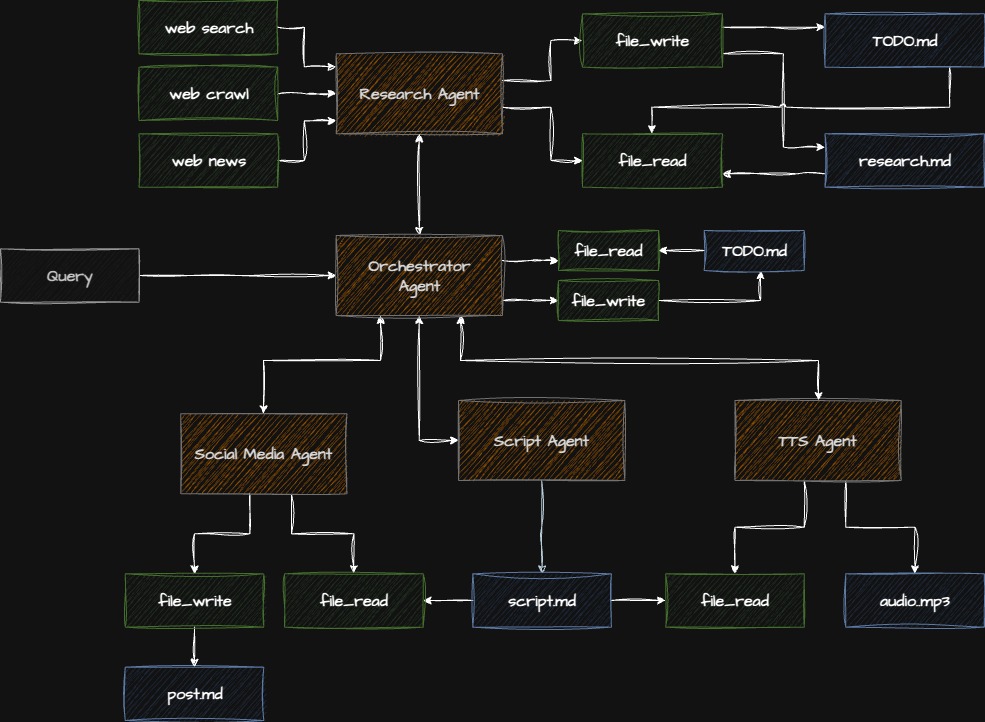
Output: Podcast Script + Social Post + Audio File
🚀 Getting Started
For Participants
1. Clone the Repository
git clone https://github.com/radixia/rooting-agentic-pipeline.git
cd rooting-agentic-pipeline
2. Install Dependencies
# Using uv (recommended)
uv sync

# Or using pip
pip install -e .
3. Set Up API Keys
Create a .env file:
cp .env.template .envAdd your API keys:
ANTHROPIC_API_KEY=your_key_here
OPENAI_API_KEY=your_key_here
TAVILY_API_KEY=your_key_here
ELEVENLABS_API_KEY=your_key_here
4. View the Workshop Website
cd workshop/site
npm install
npm run dev
Visit http://localhost:4321
5. Start Learning
Navigate through the steps in order, checking out the corresponding git tags:
git checkout v0.1.0  # Step 1
git checkout v0.3.0  # Step 2
# etc...
For Instructors
1. Review All Materials
- Read the Facilitator Guide
- Practice each step
- Test all code examples
- Prepare demos
2. Prepare Environment
- Set up demo repository
- Test API keys
- Prepare backup solutions
- Create Zoom/screen sharing setup
3. Pre-Workshop Checklist
- Send prerequisites email (1 week before)
- Test all technology
- Prepare Q&A responses
- Have backup content ready
4. During Workshop
- Follow timing guidelines
- Monitor participant progress
- Use checkpoints for alignment
- Capture questions for Q&A
🤖 Model Configuration & Costs
Default Models
The workshop uses carefully selected models to balance performance and cost:
Anthropic Claude Sonnet 4.5 (claude-sonnet-4-5-20250929)
- Used for: Script, Research, and Orchestrator agents
- Why: Excellent reasoning, large context window, reliable performance
- Cost: Moderate, good value for complex tasks
OpenAI GPT-5 Mini (gpt-5-mini-2025-08-07)
- Used for: Social Media agent
- Why: Cost-efficient while maintaining high quality
- Cost: Significantly cheaper than GPT-4o
- Performance: Excellent for social media content generation
💡 Cost Savings Tip: GPT-5 Mini provides substantial cost savings (60-80% cheaper than GPT-4o) without sacrificing quality for tasks like social media posts. This makes the workshop more affordable to run while still producing professional results.
Customizing Models
You can override the default models via environment variables:
# Use different models
export ANTHROPIC_MODEL_ID="claude-opus-4-20250514"
export OPENAI_MODEL_ID="gpt-4o"
Or in your .env file:
ANTHROPIC_MODEL_ID=claude-opus-4-20250514
OPENAI_MODEL_ID=gpt-4o
Cost Comparison
Approximate costs per 1M tokens (input/output):
| Model | Input | Output | Best For |
|---|---|---|---|
| Claude Sonnet 4.5 | $3 | $15 | Complex reasoning, long content |
| Claude Opus 4 | $15 | $75 | Maximum quality |
| GPT-5 Mini | $0.15 | $0.60 | Cost-efficient tasks |
| GPT-4o | $2.50 | $10 | Balanced performance |
Workshop Cost Estimate: Running the complete pipeline (research + script + social + audio) typically costs $0.15-0.30 per execution with default models.
🌐 Website Features
Design
Dark Theme: Professional color scheme optimized for developers
- Background:
#0f172a(slate-900) - Surface:
#1e293b(slate-800) - Accent:
#3b82f6(blue-500)
Typography: System font stack for optimal readability
Code Highlighting: GitHub Dark theme with proper syntax support
Responsive: Fixed sidebar on desktop, mobile-friendly layout
Navigation
The sidebar provides quick access to:
Workshop Steps:
- Step 1: Script Agent
- Step 2: Social Agent
- Step 3: TTS Agent
- Step 4: Research Agent
- Step 5: Orchestrator
- Step 6: Complete Pipeline
Resources:
- Materials Index 📚
- Quick Reference ⚡
- Troubleshooting 🔧
- Facilitator Guide 👨🏫
- This Guide 📖
Technical Stack
- Astro 5.14+: Static site generator
- MDX: Markdown with component support
- TypeScript: Type-safe development
- Shiki: Syntax highlighting
- Zero JavaScript: Only HTML/CSS by default
🛠️ Development
Website Commands
cd workshop/site

# Install dependencies
npm install

# Start dev server (http://localhost:4321)
npm run dev

# Build for production
npm run build

# Preview production build
npm run preview
Customizing the Website
Change Colors
Edit CSS variables in src/layouts/Layout.astro:
:root {
  --color-bg: #0f172a;           /* Background */
  --color-surface: #1e293b;      /* Cards/surfaces */
  --color-accent: #3b82f6;       /* Links/highlights */
  --color-text: #e2e8f0;         /* Main text */
  --color-text-dim: #94a3b8;     /* Secondary text */
}
Add Navigation Items
Update sidebar in src/layouts/Layout.astro:
<ul class="nav-links">
  <li><a href="/new-page" class="nav-link">New Page</a></li>
</ul>
Create New Pages
Add MDX files to src/pages/:
---
layout: ../layouts/Layout.astro
title: "My New Page"
---

# My New Page

Content here...
Modify Styles
Edit the <style> section in src/layouts/Layout.astro for global styles.
🚢 Deployment
Vercel (Recommended)
Quick Deploy:
npm install -g vercel
cd workshop/site
vercel
Automatic Deployments:
- Push to GitHub
- Connect repository to Vercel
- Auto-deploy on every push
Netlify
Via CLI:
cd workshop/site
npm run build
netlify deploy --prod --dir=dist
Via UI:
- Build command:
npm run build - Publish directory:
dist - Deploy!
GitHub Pages
Setup:
# .github/workflows/deploy.yml
name: Deploy
on:
  push:
    branches: [main]
jobs:
  deploy:
    runs-on: ubuntu-latest
    steps:
      - uses: actions/checkout@v3
      - uses: actions/setup-node@v3
      - run: cd workshop/site && npm install && npm run build
      - uses: peaceiris/actions-gh-pages@v3
        with:
          github_token: ${{ secrets.GITHUB_TOKEN }}
          publish_dir: ./workshop/site/dist
AWS S3 + CloudFront
cd workshop/site
npm run build

# Upload to S3
aws s3 sync dist/ s3://your-bucket-name/

# Invalidate CloudFront cache
aws cloudfront create-invalidation \
  --distribution-id YOUR_DIST_ID \
  --paths "/*"
Docker
# Dockerfile
FROM node:20-alpine AS builder
WORKDIR /app
COPY workshop/site/package*.json ./
RUN npm install
COPY workshop/site .
RUN npm run build

FROM nginx:alpine
COPY --from=builder /app/dist /usr/share/nginx/html
EXPOSE 80
CMD ["nginx", "-g", "daemon off;"]
Build and run:
docker build -t workshop-site .
docker run -p 8080:80 workshop-site
📈 Workshop Statistics
Content Volume
- 11 workshop files: 95+ pages total
- 6 progressive steps: 15-90 minutes of instruction
- 5 specialized agents: Script, Social, TTS, Research, Orchestrator
- 100+ code examples: Real, working code snippets
- 50+ troubleshooting scenarios: Common issues covered
Learning Outcomes
By completing this workshop, participants will:
✅ Understand agent architecture patterns
✅ Build production-ready AI agents
✅ Integrate tools (built-in and custom)
✅ Implement error handling and retries
✅ Manage tokens and conversations
✅ Orchestrate multi-agent workflows
✅ Deploy and monitor systems
✅ Apply best practices
Time Investment
Self-paced learning: ~3-4 hours
- Reading: ~2.5 hours
- Coding: ~1.5 hours
Guided workshop: 90 minutes
- Faster due to instructor guidance
- Focus on key concepts
- Skip some advanced topics
Post-workshop exploration: Unlimited!
- Extend with your own agents
- Build custom tools
- Deploy to production
🎯 Use Cases
For Companies
- Team Training: Upskill developers on AI agents
- Onboarding: Introduce new hires to your AI stack
- Lunch & Learn: Educational sessions
- Hackathons: Structured starting point
For Educators
- University Courses: Practical AI/ML lab session
- Bootcamps: Intensive agent development training
- Online Courses: Self-paced learning module
- Workshops: Conference or meetup content
For Individuals
- Learning: Master agent development
- Portfolio Projects: Showcase skills
- Prototyping: Kickstart new ideas
- Reference: Return for patterns and examples
🔧 Troubleshooting
Website Issues
Port already in use?
lsof -ti:4321 | xargs kill -9Build errors?
rm -rf node_modules package-lock.json .astro
npm install
Styles not updating?
rm -rf .astro
npm run dev
Workshop Issues
Agent initialization fails?
- Check API keys in
.env - Verify model names are correct
- Test API connectivity
Import errors?
uv sync
# or
pip install -e .
Rate limits?
- Implement retry logic (covered in Step 4)
- Use exponential backoff
- Consider rate limiting
Token limits?
- Implement conversation summarization
- Optimize prompt length
- Use appropriate max_tokens
See the Troubleshooting Guide for 50+ more issues and solutions.
📚 Additional Resources
Documentation
Workshop Materials
- Materials Index - Complete file guide
- Quick Reference - Commands and patterns
- Facilitator Guide - Instructor handbook
External Resources
🤝 Contributing
Improve the Workshop
Found a typo? Have a suggestion? Want to add content?
For Content Issues:
- Edit MDX files in
workshop/site/src/pages/ - Test locally with
npm run dev - Submit a pull request
For Website Issues:
- Edit layouts or styles in
src/ - Test thoroughly
- Submit PR with screenshots
For Code Issues:
- Fix in main repository
- Update workshop steps if needed
- Test all affected steps
Share Your Experience
After running the workshop:
- Share feedback in GitHub discussions
- Report issues you encountered
- Suggest improvements
- Share your adaptations
📄 License
This workshop is part of the rooting-pipeline project. See repository license for details.
🎓 Acknowledgments
Built with:
- Strands Agents - Agent framework
- Astro - Website builder
- Anthropic Claude - AI model
- Tavily - Search API
- ElevenLabs - Text-to-speech
Inspired by:
- Production AI agent deployments
- Developer education best practices
- Modern web development patterns
🚀 Quick Links
- Start Workshop: Step 1
- View All Steps: Materials Index
- Get Help: Troubleshooting
- Teach Workshop: Facilitator Guide
- Quick Commands: Quick Reference
Ready to build multi-agent systems? Begin Step 1 →